{
“@context”: “https://schema.org”,
“@type”: “BlogPosting”,
“headline”: “Flutter vs. React Native: Which Framework Wins in 2025?”,
“description”: “A detailed comparison of Flutter and React Native in 2025. Learn which framework offers better performance, UI, scalability, speed, and developer experience.”,
“image”: “https://www.yourwebsite.com/path-to-featured-image.jpg”,
“author”: {
“@type”: “Organization”,
“name”: “Kodexo Labs”
},
“publisher”: {
“@type”: “Organization”,
“name”: “Kodexo Labs”,
“logo”: {
“@type”: “ImageObject”,
“url”: “https://www.yourwebsite.com/path-to-logo.png”
}
},
“mainEntityOfPage”: {
“@type”: “WebPage”,
“@id”: “https://www.yourwebsite.com/flutter-vs-react-native-2025”
},
“datePublished”: “2025-01-01”,
“dateModified”: “2025-01-01”
}
Cross-platform app development has transformed the mobile industry, enabling developers to build high-performance apps for both iOS and Android using a single codebase. Among the many options available, Flutter and React Native stand out as the two leading frameworks dominating developer preference and market adoption.
As we step into 2025, the debate intensifies: Which framework is better—Flutter or React Native? Both have evolved significantly, introducing new capabilities, improved performance, and wider ecosystem support. Whether you’re a startup founder, mobile developer, or business owner, choosing the right framework is crucial for cost, efficiency, and long-term scalability.
In this detailed comparison, we explore features, performance, architecture, development speed, ecosystem, future potential, and ultimately answer the question: Which framework wins in 2025?
1. Introduction to Flutter and React Native
1.1 What is Flutter?
Flutter, developed by Google, is a UI toolkit for building natively compiled applications for mobile, web, desktop, and embedded devices using a single codebase.
Key Highlights
Language: Dart
Uses its own rendering engine
Delivers highly consistent UI across platforms
Focus on pixel-perfect, custom UI designs
Strong backing from Google → widely used in large-scale apps
1.2 What is React Native?
React Native, created by Facebook (Meta), is a JavaScript-based framework for building mobile apps that rely on native components.
Key Highlights
Language: JavaScript/TypeScript
Bridges JS code with native components
Huge developer community
Easy to learn for React.js web developers
Used by global brands like Instagram, Tesla, Shopify
2. Performance Comparison in 2025
Performance is often the first comparison point—and here’s where differences become clear.
2.1 Flutter Performance
Flutter apps are compiled directly to machine code, eliminating the need for a JavaScript bridge. This ensures:
Faster startup time
Consistent frame rates (60–120 fps)
Smooth animations
Lower memory usage
Fewer performance bottlenecks
Flutter’s custom rendering engine, Skia, draws every pixel on screen, producing visually rich interfaces with exceptional performance.
Verdict:
Flutter leads in raw performance, especially for graphics-heavy and animation-rich apps.
2.2 React Native Performance
React Native relies on a “bridge” to communicate between JavaScript code and native modules. Although improvements like JSI (JavaScript Interface) and Fabric architecture have reduced performance issues, some challenges remain:
Occasional lag with heavy animations
Higher chance of frame drops
Requires more optimization
However, the 2024/2025 Fabric update significantly improved:
Rendering performance
Memory efficiency
Multithreading
Verdict:
React Native performs very well, but Flutter still offers smoother default performance—especially at scale.
3. UI/UX Capabilities
3.1 Flutter UI
Flutter focuses on beautiful, custom UIs.
Benefits:
Consistent UI across all devices
Huge library of ready-made widgets
Adaptive design with Material & Cupertino widgets
Perfect for brands needing custom animations or micro-interactions
Flutter’s UI engine gives developers complete control over layouts, colors, and effects.
Verdict:
For highly polished designs, Flutter is unmatched.
3.2 React Native UI
React Native uses native components, meaning:
More native look and feel
Faster integration with device features
Better consistency with iOS and Android guidelines
However, UI may vary between platforms, requiring additional adjustments.
Verdict:
For native-style UIs, React Native is great. For consistent, design-heavy UIs → Flutter wins.
4. Development Speed & Productivity
4.1 Flutter
Flutter offers:
Hot reload
Excellent documentation
Ready-made widgets
Strong CLI tools
Dart DevTools for debugging
Dart may have a learning curve for JavaScript developers, but productivity increases quickly.
Verdict:
Fast for building polished UI apps, but requires learning Dart.
4.2 React Native
React Native is extremely beginner-friendly.
Why?
Uses JavaScript (widely known)
Easy for web developers to transition
Large ecosystem of npm packages
Strong third-party libraries
However, dependency issues and version conflicts can sometimes slow development.
Verdict:
React Native wins for learning curve and onboarding speed.
5. Community Support and Ecosystem in 2025
Flutter Ecosystem
Flutter’s ecosystem is rapidly growing with:
Strong Google support
Frequent updates
Increasing enterprise adoption
FlutterFlow & low-code ecosystem
Expanding plugin library (pub.dev)
Verdict:
Stable and growing fast, but still smaller than JS ecosystem.
React Native Ecosystem
React Native benefits from:
Massive JavaScript community
Countless open-source libraries
React ecosystem compatibility
Support from Meta + Shopify + Microsoft
React Native’s community is huge, making learning and troubleshooting easier.
Verdict:
React Native wins in community size and availability of packages.
6. Stability and Long-Term Reliability
Flutter Stability
Flutter is strongly backed by Google, and used in major apps like:
Google Ads
BMW App
eBay Motors
Alibaba
It also supports:
Mobile
Web
Desktop
Embedded devices
Its multi-platform future is bright.
React Native Stability
React Native is used by massive companies:
Instagram
Facebook
Tesla
Walmart
Shopify
However, JS ecosystem dependency means occasional package instability.
Verdict:
Flutter offers more predictable stability. React Native has deep industry adoption but higher dependency fragmentation.
7. Cost of Development in 2025
Both frameworks reduce development cost by enabling a single codebase.
Flutter
Faster custom UI development
Low maintenance cost
Fewer bugs due to strong type system
React Native
Larger pool of developers
Lower hiring cost
Faster prototyping
Verdict:
React Native is often slightly cheaper to develop due to JS talent availability.
8. Which Framework Wins in 2025?
To decide a winner, let’s break it down by use cases:
⭐ Best Performance: Flutter
⭐ Best UI/UX: Flutter
⭐ Best for startups & MVPs: React Native
⭐ Best for long-term scalability: Flutter
⭐ Best developer community: React Native
⭐ Best for web + mobile: Flutter (via Flutter Web)
⭐ Best for quick learning: React Native
⭐ Enterprise apps: Flutter
⭐ Apps requiring native feel: React Native
Final Verdict: Flutter Wins in 2025 — But React Native Still Matters
In 2025, Flutter is the stronger overall framework due to superior performance, consistency, scalability, and multi-platform capabilities. Its rapid growth and stable ecosystem make it ideal for professional-grade apps.
However, React Native remains highly valuable due to its large community, JavaScript familiarity, and strong use in MVPs and consumer apps.
Choose Flutter if:
You need pixel-perfect UI
You want high performance
You are building enterprise apps
You plan multi-platform support (Web, Desktop, Mobile)
Choose React Native if:
You want faster development
You already use React
You need simple mobile apps
You want the easiest learning curve
Both frameworks are excellent—and the right choice depends on your project goals.
{
“@context”: “https://schema.org”,
“@type”: “BlogPosting”,
“mainEntityOfPage”: {
“@type”: “WebPage”,
“@id”: “https://www.yourwebsite.com/understanding-mobile-app-architecture-for-beginners”
},
“headline”: “Understanding Mobile App Architecture for Beginners”,
“description”: “A beginner-friendly guide to mobile app architecture. Learn about layers, design patterns, components, scalability, and best practices to build efficient and high-performing apps.”,
“image”: “https://www.yourwebsite.com/path-to-thumbnail.jpg”,
“author”: {
“@type”: “Organization”,
“name”: “Kodexo Labs”
},
“publisher”: {
“@type”: “Organization”,
“name”: “Kodexo Labs”,
“logo”: {
“@type”: “ImageObject”,
“url”: “https://www.yourwebsite.com/path-to-logo.png”
}
},
“datePublished”: “2025-01-01”,
“dateModified”: “2025-01-01”
}
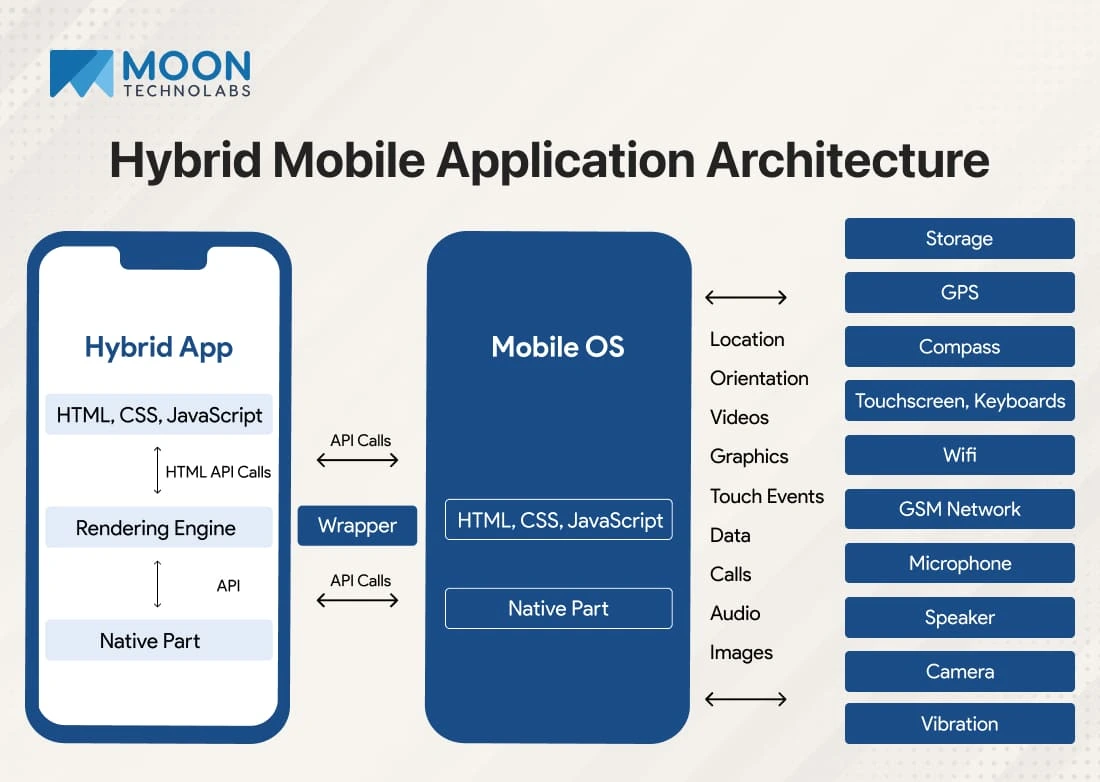
Mobile apps have become an essential part of our daily lives—helping us shop, communicate, learn, entertain, and work more efficiently. But behind every smooth, high-performing mobile app lies a well-structured architecture. For beginners entering the world of mobile development, understanding app architecture is crucial. It forms the blueprint of how an app is built, how its components interact, and how it ensures performance, scalability, and maintainability.
In this beginner-friendly guide, we’ll break down what mobile app architecture is, why it matters, its core components, popular architecture patterns, and best practices to build strong, reliable apps.
1. What Is Mobile App Architecture?
Mobile app architecture refers to the structural design that developers follow to build an app. It outlines:
How the app’s parts interact
How data flows between components
How the UI communicates with the backend
How the app handles logic, networking, and storage
Think of it as the foundation and blueprint of a building. With a strong architecture, apps become:
Faster
Easier to maintain
More scalable
Better organized
Less error-prone
Poor architecture, on the other hand, leads to crashes, slow performance, high costs, and difficulty adding new features.
2. Why Mobile App Architecture Matters
Good architecture plays a key role in the long-term success of an app. Here’s why it’s essential:
✔ Better Performance
Optimized architecture reduces unnecessary processing, resulting in faster load times and smoother interactions.
✔ Easier Maintenance
Clear structure allows developers to update features, fix bugs, and scale without rewriting major parts of the app.
✔ Strong Security
Architectural layers protect sensitive data and reduce vulnerabilities.
✔ Scalability
Apps can easily handle growing users, features, and data without performance issues.
✔ Improved User Experience
Efficient apps with quick responses and smooth navigation keep users satisfied and engaged.
3. Key Layers of Mobile App Architecture
Most mobile apps follow a layered approach. The three major layers are:
3.1 Presentation Layer (UI/UX)
This is the front end—everything the user sees and interacts with.
Includes:
App screens
Navigation
UI components (buttons, menus, forms)
Visual design
Goals:
Provide intuitive navigation
Display information clearly
Offer smooth animations and transitions
Adapt to different screen sizes
Frameworks like SwiftUI, Jetpack Compose, React Native UI, Flutter Widgets help build this layer.
3.2 Business Logic Layer (BLL)
The Business Logic Layer handles the app’s core functionality—what happens behind the UI.
Includes:
Algorithms
State management
Payment calculations
Form validations
Decision making
Data transformation
Its purpose is to ensure the app behaves correctly based on user actions.
3.3 Data Layer
This is where data is stored, accessed, and managed.
Includes:
API calls
Database queries
Local storage
Cloud storage
Data repositories
Responsibilities:
Communicating with remote servers
Managing local databases (SQLite, Room, CoreData, Hive)
Handling offline mode
Secure data storage
By separating these layers, developers maintain clean, scalable, and efficient code.
4. Components of a Good Mobile App Architecture
An effective architecture should include the following components:
4.1 Modularization
Break down the app into independent modules (authentication, payment, profile). This reduces complexity and simplifies updates.
4.2 Navigation System
A smooth and predictable navigation system improves user experience.
Frameworks:
Android Navigation Component
iOS Navigation Stack
Flutter Navigator
React Navigation
4.3 Networking Layer
Handles communication with APIs.
Tools:
Retrofit (Android)
Alamofire (iOS)
Axios / Fetch (React Native)
HTTP package (Flutter)
4.4 Error Handling
Proper architecture anticipates and manages errors such as:
API failures
No internet connection
Invalid user input
This prevents app crashes and enhances stability.
4.5 Security
Architecture should ensure:
Encrypted storage
Secure API calls
Authentication / authorization
Protection against vulnerabilities
4.6 Data Caching
Improves performance and reduces API calls, especially for frequently accessed data.
5. Popular Mobile App Architecture Patterns
Beginners often struggle to choose the right architecture pattern. Here are the most widely used ones:
5.1 MVC (Model-View-Controller)
Model: Manages data
View: User interface
Controller: Connects Model and View
Good for small apps but becomes difficult to manage as the app grows.
Used in:
iOS apps (UIKit)
Older Android projects
5.2 MVP (Model-View-Presenter)
The Presenter handles the UI logic instead of the Controller.
Benefits:
More testable
Clean separation
Popular in Android before MVVM.
5.3 MVVM (Model-View-ViewModel)
The ViewModel handles UI logic and exposes data to the View through observers.
Benefits:
Great for modern apps
Easy to test
Reduces boilerplate
Works well with LiveData, StateFlow, SwiftUI, Flutter’s Provider
MVVM is the most common architecture used today.
5.4 Clean Architecture
Introduced by Robert C. Martin, this approach separates the app into:
Presentation
Domain
Data
Benefits:
Highly scalable
Easy to maintain
Extremely testable
Used by large-scale enterprise apps.
5.5 Unidirectional Data Flow (UDF)
Used in frameworks like:
Flutter (Bloc, Provider)
React Native (Redux)
Benefits:
Predictable state
Easier debugging
Suitable for complex apps
6. Backend Architecture in Mobile Apps
Behind every mobile app lies a backend architecture that handles:
✔ User authentication
✔ Data storage
✔ Push notifications
✔ Payment processing
✔ Server-side logic
✔ Analytics
Common backend technologies:
Node.js
Firebase
Django
Laravel
Spring Boot
AWS Amplify
Supabase
Backend architecture must be scalable, secure, and optimized for low latency.
7. Factors to Consider When Designing Mobile App Architecture
7.1 Platform (iOS, Android, Cross-Platform)
Architecture structure may vary depending on the platform.
SwiftUI + Combine (for iOS)
Kotlin + Jetpack Compose (for Android)
Flutter or React Native (for cross-platform)
7.2 Type of App
Architecture differs for:
Ecommerce apps
Social media apps
IoT apps
Gaming apps
Fintech apps
On-demand apps
7.3 Performance Requirements
High-performance apps need:
Caching
Asynchronous processing
Local storage
Efficient networking
7.4 Scalability Needs
Apps expecting large user growth must adopt patterns like:
MVVM
Clean Architecture
Microservices backend
7.5 Offline Functionality
Apps without internet access should still operate using local storage and sync mechanisms.
8. Best Practices for Beginners
To build a clean and efficient app architecture, follow these tips:
8.1 Keep It Simple
Avoid over-engineering. Start with basic architecture and improve as needed.
8.2 Separate UI and Logic
Never mix UI code with business logic—this makes maintenance difficult.
8.3 Use Design Patterns
Patterns like MVVM, Repository Pattern, Dependency Injection make apps more scalable.
8.4 Follow Coding Standards
Use consistent naming, folder structures, and documentation.
8.5 Optimize for Performance
Implement:
Lazy loading
Caching
Optimized API calls
Efficient data handling
8.6 Always Think Scalability
Build architecture that can grow with your app’s user base and features.
8.7 Use Thorough Testing
Unit tests, UI tests, and integration tests ensure strong app quality.
9. Common Mistakes Beginners Should Avoid
Mixing business logic with UI
Ignoring data flow design
Adding too many dependencies
Not planning navigation early
Poor error handling
Not optimizing network calls
Failing to secure user data
Avoiding these mistakes can save huge development time and effort.
10. Conclusion
Understanding mobile app architecture is essential for beginners who want to build reliable, scalable, and well-performing apps. A strong architecture ensures that the app runs smoothly, adapts to new features easily, and delivers a great user experience.
By learning the layers, components, and popular patterns like MVC, MVP, MVVM, and Clean Architecture, developers can make informed decisions that lead to successful project outcomes.
Whether you’re building a simple app or a large enterprise solution, a well-designed architecture is the foundation of every great mobile application.
{
“@context”: “https://schema.org”,
“@type”: “BlogPosting”,
“mainEntityOfPage”: {
“@type”: “WebPage”,
“@id”: “https://www.yourwebsite.com/how-to-improve-app-performance-optimization-techniques”
},
“headline”: “How to Improve App Performance: Optimization Techniques”,
“description”: “Learn how to improve mobile app performance through optimization techniques. Discover tips to boost app speed, reduce load times, enhance UI responsiveness, and provide a seamless user experience.”,
“image”: “https://www.yourwebsite.com/path-to-thumbnail.jpg”,
“author”: {
“@type”: “Organization”,
“name”: “Kodexo Labs”
},
“publisher”: {
“@type”: “Organization”,
“name”: “Kodexo Labs”,
“logo”: {
“@type”: “ImageObject”,
“url”: “https://www.yourwebsite.com/path-to-logo.png”
}
},
“datePublished”: “2025-01-01”,
“dateModified”: “2025-01-01”
}
In today’s digital landscape, users expect mobile applications to be fast, responsive, and reliable. Even the best-designed app can fail if its performance is poor—slow loading times, battery drain, crashes, or lagging interactions can drive users to uninstall instantly. A high-performing app keeps users engaged, boosts retention, improves ratings, and enhances overall brand perception.
As mobile apps grow more complex with increased functionality and data processing, optimizing performance is more important than ever. This comprehensive guide explores effective techniques, tools, and best practices to help developers improve mobile app performance for iOS and Android platforms.
1. Why App Performance Optimization Matters
Performance directly impacts user satisfaction and business success. Here’s why app optimization is crucial:
✔ User Retention
Slow apps cause frustration, leading users to abandon or uninstall them. Studies show users expect apps to load within 2 seconds or less.
✔ Higher App Store Rankings
Performance issues often result in negative reviews. Optimized apps receive better ratings, leading to higher visibility and downloads.
✔ Better Conversion Rates
Fast apps improve user journey efficiency, increasing conversions in ecommerce, fintech, SaaS, and service-based apps.
✔ Reduced Resource Usage
Optimizing performance reduces battery consumption, memory usage, and data load—ensuring smoother experiences on all devices.
2. Key App Performance Metrics to Track
Before optimizing, it’s essential to know what to measure. Core metrics include:
2.1 App Load Time
How long the app takes from launch to fully usable.
2.2 Frame Rate (FPS)
Smooth animations and transitions rely on stable frame rates (typically 60 FPS for mobile).
2.3 Memory Usage
Excessive memory consumption can lead to crashes and slowdowns.
2.4 CPU Usage
High CPU usage means overheating, battery drain, and lag.
2.5 Network Latency
Measure the delay in sending/receiving data from servers or APIs.
2.6 Crash Rate
An app should maintain a low crash percentage—preferably below 1%.
Tools like Firebase Performance Monitoring, Xcode Instruments, and Android Profiler help track these metrics.
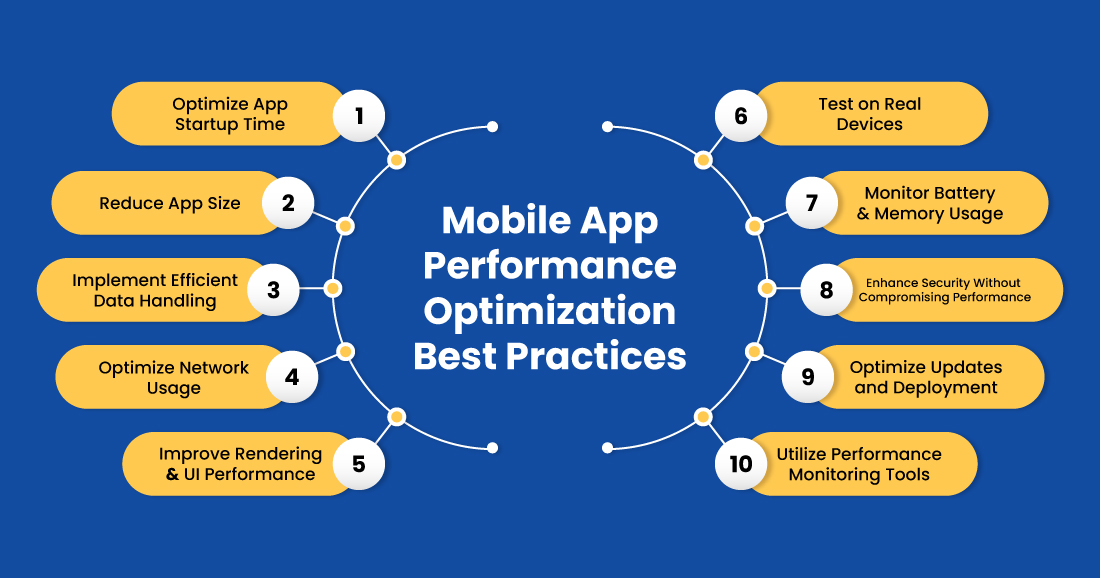
3. Techniques to Improve App Performance
Let’s explore powerful optimization techniques that significantly enhance speed, responsiveness, and stability.
3.1 Optimize App Launch Time
A fast app launch creates a strong first impression. Techniques include:
Reduce the work executed during onCreate() in Android or didFinishLaunching in iOS.
Lazy-load features instead of loading all modules at startup.
Use lightweight splash screens.
Minimize app initialization code.
Defer non-essential API calls.
Aim: Your app should launch in under 2 seconds.
3.2 Use Efficient Data Loading
Data-heavy apps must handle loading smartly:
✔ Implement pagination
Load content in chunks instead of fetching everything at once.
✔ Use background loading
Run heavy tasks on background threads, not on the main UI thread.
✔ Use caching strategies
Cache API responses, images, and static content to reduce redundant requests.
✔ Optimize database queries
Use indexing, optimized schemas, and reduction of unnecessary joins.
3.3 Reduce Network Usage
Network calls are expensive and slow down performance.
Techniques:
Compress API responses
Use HTTP/2 or gRPC for faster data transport
Implement offline mode
Reduce frequency of real-time API polls
Cache API responses intelligently
Batch multiple small network calls
Optimizing network usage makes the app faster and more reliable, especially in low-connectivity regions.
3.4 Optimize Images and Media Content
Images often contribute most to app bloat.
Use the following:
WebP format for lightweight images
Lazy loading for media
Responsive image sizing
Compress images without losing quality
Use vector graphics where possible
Optimized images reduce load time and improve UI smoothness.
3.5 Reduce and Optimize App Size
Large app sizes deter installations and slow performance.
Optimization strategies:
Remove unnecessary libraries
Use ProGuard or R8 for Android code shrinking
Split APKs by architecture
Use on-demand feature modules
Minify resources like fonts and images
A smaller app means quicker downloads, less disk usage, and better performance.
3.6 Improve Rendering and UI Performance
UI responsiveness is essential for a smooth user experience.
Best practices:
Maintain 60 FPS
Avoid heavy layout nesting
Use ConstraintLayout (Android) and AutoLayout (iOS)
Preload UI components
Minimize overdraw
Keep animations lightweight
A snappy UI keeps users engaged and satisfied.
3.7 Use Background Threads for Heavy Tasks
Don’t block the main UI thread.
Move tasks such as:
JSON parsing
File operations
Image processing
API calls
Database queries
Use:
Coroutines (Kotlin)
RxJava
AsyncTask (deprecated but replaced by better alternatives)
GCD (iOS)
Combine framework (iOS)
This ensures seamless interactions.
3.8 Optimize Battery Usage
Battery drain can lead to negative reviews and uninstalls.
Reduce power consumption by:
Minimizing GPS and location checks
Reducing background services
Avoiding unnecessary wake-locks
Using push notifications instead of polling
Optimizing network calls
Efficient battery usage strengthens user trust.
3.9 Ensure Smooth Scroll and Transition Performance
Laggy scrolling feels unprofessional.
Improve performance by:
Using view recycling (RecyclerView, UITableView)
Prefetching lists
Reducing heavy UI overlays
Avoiding large DOM-like UI trees
Using placeholders for content loading
Scrolling should feel natural and fluid.
3.10 Use Performance Testing Tools
Always test app performance under real-world conditions using:
Tools:
Android Profiler
Xcode Instruments
Firebase Performance
Flipper
New Relic
AppDynamics
Charles Proxy
Performance testing ensures consistent reliability across devices.
4. Advanced Optimization Techniques
Once basic optimizations are in place, advanced techniques can supercharge performance.
4.1 Leverage CDN for Faster Content Delivery
Using Content Delivery Networks allows users worldwide to access content quickly.
Benefits:
Lower latency
Faster API responses
Improved security
More reliable content loading
CDNs drastically enhance media-heavy apps.
4.2 Use Machine Learning for Predictive Performance
AI can help optimize:
Cache invalidation
Image compression
Prefetching user data
Personalizing app experience
Machine learning models predict usage patterns and optimize accordingly.
4.3 Adopt 5G-Aware Optimization
Apps can leverage 5G networks to:
Stream high-quality content
Offload computations to the cloud
Improve real-time interactions
Reduce local resource usage
5G opens new performance possibilities.
4.4 Implement Code Optimization
Efficient code helps reduce load time and memory consumption.
Practices:
Remove dead code
Refactor complex methods
Optimize loops and recursion
Use efficient data structures
Avoid memory leaks
Clean code equals optimal performance.
4.5 Use On-Demand Resources
Instead of loading everything on launch:
Download resource packs only when needed
Stream data dynamically
Use app bundles for modular delivery
This keeps the app lightweight and fast.
5. Reducing Crash Rates and Improving Stability
Stability is as crucial as speed.
Reduce crashes by:
Avoiding null pointer exceptions
Handling API failures gracefully
Monitoring memory leaks
Testing across device types
Logging errors for future fixes
Implementing retry logic for network calls
Stable apps build long-term user loyalty.
6. Monitoring & Continuous Optimization
Performance optimization isn’t a one-time job.
Continuously monitor:
App startup performance
User sessions
Crash logs
Slow API responses
Memory leaks
Network performance
Deploy updates regularly to keep the app at peak performance.
7. Common Mistakes That Hurt App Performance
Avoid these pitfalls:
Loading too much data at once
Running heavy tasks on the main thread
Excessive API polling
Unoptimized image formats
Lack of caching
Poor memory management
Overuse of animations
Addressing these issues drastically improves user experience.
8. Conclusion
Improving app performance is essential to delivering top-notch user experiences and ensuring long-term success. By optimizing loading times, reducing memory and network usage, improving UI responsiveness, and using the right tools, developers can create apps that feel fast, smooth, and reliable across all devices.
As user expectations rise and apps become more complex, performance optimization becomes an ongoing process—one that pays off with better retention, higher ratings, and stronger brand loyalty.
With the techniques in this guide, you can build high-performing mobile apps that users love and trust.
Chatbots have become one of the most valuable features in modern mobile applications. As users demand faster responses, personalized interactions, and seamless support, chatbots help businesses deliver instant communication at scale. When integrated properly, chatbots enhance user engagement, reduce operational costs, and significantly improve customer satisfaction.
However, adding a chatbot to a mobile app is not as simple as plugging in an API. To ensure smooth performance and meaningful interaction, developers must follow best practices for design, functionality, and user experience.
In this blog, we’ll explore why chatbots matter, what types of chatbots work best for mobile apps, and the top best practices for integrating them effectively.
1. Why Chatbots Are Essential in Modern Mobile Apps
Chatbots are no longer optional—they’re becoming a standard expectation. Users want:
24/7 instant support
Quick navigation and answers
Personalized recommendations
Faster problem-solving
Simple conversational interfaces
For businesses, chatbots offer:
Reduced customer support costs
Higher conversion rates
Improved user engagement
Automation of repetitive tasks
Better data collection and personalization
Mobile apps across industries—ecommerce, fintech, healthcare, travel, education, and SaaS—now use chatbots as virtual assistants that guide users at every step.
2. Types of Chatbots Used in Mobile Applications
There are three main types of chatbots. Choosing the right one depends on your app’s purpose.
2.1 Rule-Based Chatbots
These use predefined scripts and responses. Best for:
FAQs
Appointment booking
Basic customer support
They are fast and reliable but limited in complex interactions.
2.2 AI-Powered Chatbots
These use Natural Language Processing (NLP) and Machine Learning (ML) to understand user intent. Best for:
Personalized recommendations
Conversational flows
Multi-language support
They improve over time and deliver a human-like chat experience.
2.3 Hybrid Chatbots
Combines rule-based logic with AI capabilities. Best for:
Apps needing both accuracy and flexibility
Large-scale support systems
Apps with varied user queries
Hybrid models offer the most balanced solution.
3. Best Practices for Integrating Chatbots in Mobile Apps
Let’s look at the most important practices to ensure smooth and effective chatbot integration.
3.1 Define Clear Objectives and Use Cases
Before integrating a chatbot, ask:
What problems should it solve?
What actions should users be able to perform?
Should it provide support, recommendations, or navigation?
Does it need AI or a simple rule-based workflow?
Clear objectives help build a chatbot that is purposeful and effective.
3.2 Choose the Right Chatbot Platform
Popular chatbot platforms include:
Dialogflow
Microsoft Bot Framework
IBM Watson
AWS Lex
ChatGPT API
ManyChat / MobileMonkey for simpler bots
Ensure your platform supports:
✔ Multilingual capability ✔ Integration with mobile SDKs ✔ Scalability ✔ NLP and intent recognition ✔ Analytics dashboard
3.3 Create a Conversational and Human-Like Flow
A chatbot should feel natural—not robotic. Follow these tips:
Use simple, clear language
Predict user needs and offer suggestions
Provide quick replies and button options
Use a friendly tone and personality
A conversational flow reduces friction and improves overall UX.
3.4 Implement a Simple and Intuitive UI
Your chatbot interface should:
Be easily accessible from anywhere in the app
Include a clear chat bubble icon
Display messages in clean, readable formats
Allow users to send voice messages or attachments (if relevant)
Support dark mode
Design plays a crucial role in the chatbot’s usability.
3.5 Include Fallback Options
Even AI chatbots can misunderstand queries.
Make sure your chatbot can:
Ask clarifying questions
Redirect users to human support agents
Provide alternative suggestions
Offer relevant help articles
Fallback options prevent user frustration.
3.6 Ensure Fast Response Times
Speed is essential in chatbots. Optimize:
API calls
Server response times
NLP processing
Data storage
Network efficiency
A slow chatbot defeats its own purpose.
3.7 Add Personalization
Personalized interactions increase engagement. Your chatbot should:
Greet users by name
Use previous chat history
Recommend products based on preferences
Offer localized responses
Adapt based on user behavior
AI-based personalization significantly boosts satisfaction and conversions.
3.8 Secure User Data and Maintain Privacy
Chatbots often handle sensitive info. Follow:
✔ End-to-end encryption ✔ GDPR and HIPAA compliance ✔ Two-factor authentication for sensitive queries ✔ Safe APIs and encrypted databases
Always inform users about how their data is used.
3.9 Allow Seamless Human Handoff
Your bot should recognize when human intervention is needed. Smooth handoff means:
Transferring the conversation context
Avoiding repeated questions
Not making users wait long
Hybrid support offers the best customer experience.
3.10 Provide Multilingual Support
If your user base is global, the chatbot should support multiple languages. AI-powered NLP makes this possible without needing separate scripts.
3.11 Use Chatbot Analytics to Improve Continuously
Analyze:
Common queries
Drop-off points
User satisfaction scores
Response performance
Engagement patterns
Use this data to update intents, improve flows, and enhance accuracy over time.
3.12 Integrate Voice Capabilities (Optional but Powerful)
Voice-enabled chatbots offer:
Hands-free experience
Accessibility for users with disabilities
Faster communication
Integrations such as SiriKit, Google Assistant APIs, or custom voice commands enhance usability.
4. Benefits of Well-Integrated Chatbots in Mobile Apps
When executed correctly, chatbots bring measurable advantages:
✔ 4.1 24/7 Instant Support
Users receive answers anytime without waiting for human agents.
✔ 4.2 Reduced Operational Costs
Automated support decreases the need for large customer service teams.
✔ 4.3 Higher Conversion Rates
Bots guide users through:
Product recommendations
Onboarding
Checkout support
Subscription signups
This improves conversions significantly.
✔ 4.4 Better User Engagement
Chatbots keep users engaged through:
Personalized suggestions
Gamified responses
Timely notifications
✔ 4.5 Faster Onboarding
Bots can act as virtual guides, showing new users how to navigate your app.
✔ 4.6 Improved Customer Insights
Chatbots collect valuable data on:
User preferences
Frequently asked questions
Pain points
Behavioral patterns
This helps businesses refine their app features.
5. Industries Benefiting Most from Chatbot Integration
Chatbots are transforming multiple industries:
Ecommerce
Product suggestions
Order tracking
Assisted shopping
Fintech
Account queries
Fraud alerts
Payment assistance
Healthcare
Appointment booking
Symptom checking
Medication reminders
Travel & Hospitality
Booking assistance
Real-time updates
Travel recommendations
Education
Virtual tutors
Course guidance
Doubt-solving
SaaS
Onboarding
Ticket creation
Real-time support
6. Common Mistakes to Avoid
Overloading the chatbot with features
Ignoring user feedback
Not training the AI model regularly
Poor UI placement
No human fallback
Script-only bots for complex use cases
Avoiding these ensures a smoother experience.
7. The Future of Chatbots in Mobile Apps
The future is even more exciting with trends like:
Emotion recognition
More advanced NLP
Voice-dominant interactions
Predictive responses
AI-powered virtual companions
Seamless omnichannel integrations
Chatbots will evolve from support assistants to smart digital partners.
8. Conclusion
Integrating chatbots into mobile applications can dramatically improve user experience, boost engagement, and streamline business operations. But to achieve these benefits, developers must adopt the right strategies—clear use cases, intuitive UI, strong NLP capabilities, fast responses, security, and continuous improvements.
When done correctly, chatbots become powerful assets that elevate your mobile app and deliver meaningful interactions.
The evolution of mobile technology has always been driven by the need for speed, connectivity, and better user experiences. Now, with the global rollout of 5G networks, the mobile ecosystem is undergoing one of its most significant transformations ever. For mobile applications, 5G represents far more than just “faster internet”—it opens the doors to next-generation app experiences, real-time interactions, and powerful innovations that were impossible with previous network generations.
In this blog, we explore how 5G is changing mobile app performance and user experience, the technological shifts it brings, and how developers and businesses can leverage this revolution.
1. Understanding the Power of 5G
5G, the fifth-generation mobile network, is designed to deliver:
Ultra-high speeds (up to 10 Gbps)
Lower latency (as low as 1 millisecond)
Massive device connectivity (ideal for IoT ecosystems)
Higher bandwidth for rich media and complex applications
Compared to 4G LTE, 5G is up to 100 times faster, 20 times more responsive, and capable of handling 1 million devices per square kilometer.
Such dramatic improvements reshape the fundamentals of mobile app development, enabling richer experiences across industries like gaming, healthcare, entertainment, transportation, and ecommerce.
2. Key Capabilities of 5G Driving the Transformation
To understand how 5G impacts mobile apps, let’s break down its most influential features.
✔ 2.1 Ultra-Fast Speed
Internet speeds on 5G can reach multi-gigabit levels, enabling instant downloads, high-quality streaming, and seamless real-time interactions. Apps can load faster, refresh instantly, and handle heavier content without lag.
✔ 2.2 Ultra-Low Latency
Latency measures the delay between input and response. While 4G offers ~50 ms, 5G reduces this to 1–10 ms, enabling real-time communication and more interactive app features.
✔ 2.3 Higher Network Capacity
5G can handle millions of connected devices simultaneously. This makes it ideal for smart cities, IoT applications, wearables, and real-time tracking systems.
✔ 2.4 Improved Reliability
5G networks offer more stable connectivity, meaning mobile apps experience fewer interruptions and smoother performance.
These capabilities make 5G a true game-changer for mobile applications across all categories.
3. How 5G Is Transforming Mobile App Performance
With its powerful capabilities, 5G affects mobile apps in several transformative ways.
3.1 Faster App Load Times
One of the most noticeable improvements users experience is dramatically faster load times. Apps that require large data transfers—video apps, ecommerce platforms, social networks—benefit the most. Long wait times disappear, enhancing both performance and satisfaction.
3.2 Real-Time Processing and Instant Responses
AI-powered apps, voice assistants, and interactive apps work much faster with 5G. For instance:
Voice commands execute instantly
Real-time location tracking becomes precise
Apps with live data streams update continuously
This shift creates smoother, more natural user experiences.
3.3 High-Quality Video and Media Performance
5G supports 4K and even 8K video streaming, AR filters, deep AI rendering, and live HD video calls with no buffering. Apps like Netflix, YouTube, and Instagram can offer superior image quality without compromising speed.
3.4 Increased Cloud-Based Functionality
5G allows applications to process more tasks on the cloud rather than on-device. This:
Reduces app size
Increases performance
Keeps devices cooler
Extends battery life
Apps can offload heavy computations—AI processing, game rendering, data analysis—directly to the cloud, making even low-end phones feel powerful.
3.5 Smoother App Updates and Downloads
Users can download or update apps within seconds, removing one of the big friction points in mobile usage. This is especially beneficial for:
Large games
Enterprise apps
Productivity tools
AR/VR applications
Developers can also release bigger updates without worrying about slow downloads.
3.6 Enhanced App Security
5G integrates advanced encryption and security features at the network level. Combined with faster processing, apps can implement:
Real-time fraud detection
Biometric security enhancements
Secure IoT communication
Multi-factor authentication with minimal delay
This results in a safer experience for users and businesses alike.
4. How 5G Is Enhancing User Experience
Beyond performance, 5G completely elevates the user experience in ways that reshape entire app categories.
4.1 Evolution of Mobile Gaming
5G is a massive boost for the gaming industry. Features enabled include:
Ultra-low latency for real-time multiplayer gaming
Cloud gaming with console-quality visuals
AR/VR games without lag or motion sickness
Large map rendering and immersive open worlds
Gamers no longer need high-end smartphones for premium performance.
4.2 Immersive AR and VR Experiences
With 5G, AR/VR apps can deliver:
Real-time object tracking
High-resolution rendering
AR navigation in real environments
VR meetings and classrooms
Interactive 3D product demos
Industries like retail, education, and real estate are benefiting from this shift.
4.3 Smarter IoT and Wearable Apps
5G offers massive connectivity, making IoT ecosystems more powerful. Wearable apps can track:
Health vitals in real time
Smart home actions
Fleet management
Asset tracking
This is transforming healthcare, logistics, smart homes, and lifestyle apps.
4.4 Enhanced Live Streaming and Communication
5G’s reliability and speed improve:
Live event streaming
Video conferencing
Real-time collaboration apps
Social media live features
Users experience minimal lag and improved clarity, even in crowded areas.
4.5 Seamless Multi-Device Interactions
5G enables apps to interact smoothly across smartphones, smart TVs, wearables, IoT sensors, and vehicles. This results in:
Better device syncing
Cross-device content streaming
Real-time multi-device controls
Smart environments—homes, offices, cities—are now more connected.
5. Industry Applications of 5G-Enhanced Mobile Apps
5G is not just enhancing apps; it’s revolutionizing entire industries. Here’s how:
5.1 Healthcare
Remote surgery assistance
Real-time patient monitoring
Mobile diagnostics
Telemedicine with HD video
Healthcare apps become more reliable and life-saving.
5.2 Retail & Ecommerce
AR try-on experiences
Real-time inventory updates
Super-fast checkout
Personalized shopping
5G enables rich, immersive shopping apps.
5.3 Transportation & Automotive
Real-time traffic updates
Vehicle-to-everything (V2X) communication
Automated driving support
Smart fleet management
Mobile apps play a critical role in next-gen mobility.
5.4 Entertainment & Media
Live concerts and sports in 4K
Cloud-rendered movies and games
Immersive virtual events
5G apps are reshaping how people consume entertainment.
5.5 Manufacturing
Remote equipment control
Real-time monitoring
Predictive maintenance apps
Factories are becoming smarter and more automated.
6. How Developers Must Adapt to 5G-Driven Changes
For app developers, 5G unlocks new possibilities but also increases expectations. Developers must focus on:
✔ Optimizing for real-time interactions
✔ Leveraging cloud processing
✔ Integrating AR/VR capabilities
✔ Enhancing network security
✔ Using high-resolution media
✔ Supporting multi-device ecosystems
5G encourages developers to rethink app architecture—from UX to back-end systems.
7. Challenges to Consider
While 5G brings power, it also brings challenges:
Limited global coverage in some regions
High infrastructure cost
Battery drain for constant high-speed connectivity
Security concerns related to IoT expansion
Increased development complexity
However, as the network matures, these challenges will diminish.
8. The Future of Mobile Apps in a 5G World
With continued rollout and adoption, 5G will lead to:
🌟 Fully cloud-powered apps
🌟 Expanded AR/VR integration
🌟 Smarter AI-driven experiences
🌟 Instant computing and near-zero load times
🌟 More immersive entertainment
🌟 Hyper-connected IoT ecosystems
Mobile applications will become faster, smarter, more interactive, more secure, and more powerful than ever.
9. Conclusion
5G is redefining what mobile apps can achieve. From ultra-fast speeds and real-time processing to high-quality media and immersive technologies, the shift is transforming both performance and user experience. Industries across healthcare, gaming, retail, transportation, and entertainment are witnessing revolutionary improvements—all fueled by 5G’s capabilities.
For developers, businesses, and users alike, 5G is more than a technological upgrade—it’s the foundation for the next generation of mobile innovation. As adoption grows, the apps of tomorrow will be more immersive, intelligent, responsive, and interconnected than anything we’ve experienced before.
Artificial Intelligence (AI) is no longer just a buzzword—it has become the backbone of modern mobile application development. From personalized recommendations and predictive analytics to smart automation and enhanced security, AI is reshaping the way mobile apps are built, optimized, and used. As businesses increasingly adopt AI-driven solutions, developers are innovating faster than ever, creating mobile experiences that are intuitive, responsive, and deeply aligned with user needs.
In this in-depth article, we explore how AI is transforming mobile application development, the technologies driving this shift, practical use cases, and why AI-powered mobile apps are becoming essential for businesses in 2025 and beyond.
1. Understanding AI in Mobile App Development
Artificial Intelligence refers to technologies that allow machines to simulate human intelligence. In mobile apps, AI enables applications to:
Learn from user behavior
Make intelligent recommendations
Analyze data in real time
Perform tasks autonomously
Understand natural language, images, and voice
AI integrates deeply into mobile app ecosystems through technologies like Machine Learning (ML), Natural Language Processing (NLP), Computer Vision, Deep Learning, and Predictive Analytics. These tools enhance functionality and give apps the ability to adapt and evolve continuously.
2. Why AI Is a Game-Changer for Mobile Apps
AI is revolutionizing the mobile app industry for several reasons:
✔ Massive Data Availability
Mobile devices generate enormous amounts of data—location, usage behavior, preferences, interactions, etc. AI helps process and understand this data efficiently.
✔ Faster Decision-Making
AI-powered apps can make instant decisions based on real-time data, helping users get faster responses and better solutions.
✔ Enhanced User Experience
Custom recommendations, smart notifications, and personalized content improve engagement and retention.
✔ Automation of Complex Tasks
AI reduces dependency on human intervention by automating everything—from customer support to fraud detection.
✔ Competitive Advantage
Businesses using AI-driven apps have higher conversion rates, better customer satisfaction, and lower operational costs.
3. Key AI Technologies Transforming Mobile App Development
3.1 Machine Learning (ML)
Machine Learning allows mobile apps to learn from user behavior and improve functionality over time. Examples:
Netflix recommending movies
Amazon personalizing product suggestions
Social apps improving content feed based on interactions
Developers integrate ML using platforms like TensorFlow Lite, Core ML, and Azure ML.
3.2 Natural Language Processing (NLP)
NLP allows apps to understand and interpret human language. Examples:
Voice assistants like Siri, Alexa, Google Assistant
Chatbots that understand user intent
Real-time language translators
NLP is key for creating more intuitive and conversational interfaces.
3.3 Computer Vision
Computer Vision enables apps to interpret images and videos. Use cases include:
Face recognition in security apps
Object detection in camera apps
AR (Augmented Reality) filters on Instagram and Snapchat
Medical imaging apps diagnosing health issues
With tools like OpenCV and Google ML Kit, computer vision has become a must-have feature.
3.4 Deep Learning
Deep Learning uses neural networks to enhance app intelligence. Applications include:
Highly accurate speech recognition
Personalized content filtering
Fraud detection in fintech apps
Deep learning creates apps that become smarter as more data is collected.
3.5 Predictive Analytics
Predictive analytics forecasts future behavior based on past data. Examples:
Predicting user shopping patterns
Identifying potential churn
Suggesting personalized offers at the right moment
It helps businesses make strategic decisions that improve conversions and retention.
4. How AI Is Transforming Mobile App Development
AI is reshaping every stage of mobile development—from ideation and UX design to deployment and optimization.
4.1 Smarter App Personalization
AI allows apps to provide users with unique, customized experiences based on their preferences, habits, and interactions. Examples:
Spotify recommending personalized playlists
Fitness apps creating custom workout plans
News apps showing articles based on reading history
This level of personalization significantly boosts engagement and user satisfaction.
4.2 AI-Powered Chatbots & Virtual Assistants
AI-enabled chatbots have evolved into sophisticated virtual assistants capable of understanding context and emotion. They can:
Respond to user queries instantly
Offer product recommendations
Book appointments or complete transactions
Provide multilingual support
In 2025, 60% of businesses use AI chatbots to improve customer support and reduce operational costs.
4.3 Advanced App Security & Fraud Detection
Security is one of the biggest concerns in mobile development. AI strengthens app security by:
Tools like GitHub Copilot help developers write optimized code.
✔ Automated Testing
AI detects bugs, user issues, and performance bottlenecks.
✔ Deployment & Optimization
Post-launch, AI analyzes user data to suggest improvements and new features.
7. Benefits of Integrating AI in Mobile Apps
1. High Personalization
AI tailors content, features, and interfaces for each user.
2. Increased Efficiency
AI automates processes, saving time and reducing manual work.
3. Better Decision Making
Businesses gain insights from user behavior and data patterns.
4. Stronger Security
AI detects threats and prevents cyberattacks.
5. Improved Customer Support
Chatbots provide 24/7 assistance.
6. Enhanced User Retention
Personalized UX and smart notifications keep users engaged.
8. Challenges of AI in Mobile App Development
Despite its advantages, AI integration also brings challenges:
1. Data Privacy Concerns
Handling user data requires strict compliance with regulations like GDPR, HIPAA, and CCPA.
2. High Development Costs
AI apps require more resources, skilled developers, and infrastructure.
3. Processing Power Limitations
AI algorithms need advanced hardware, but smartphones continue to evolve to support this.
4. Dependency on Quality Data
AI performance directly depends on the quantity and accuracy of training data.
5. Integration Complexity
AI requires robust backend systems and may complicate architecture.
9. The Future of AI in Mobile App Development
AI’s influence on mobile apps is only growing. Here’s what to expect:
✔ Hyper-Personalized Experiences
Apps will adapt dynamically to user emotions, voice tone, and real-time behavior.
✔ AI-Generated Code
More advanced tools will autonomously generate large portions of app code.
✔ Predictive Security Systems
Apps will detect vulnerabilities before they happen.
✔ Emotion Recognition
AI will identify user mood using facial expressions and voice patterns.
✔ Fully Automated Customer Support
AI-powered conversational systems will handle end-to-end support.
✔ More AR/VR Integration
AI will enhance augmented and virtual reality experiences.
The future of mobile development will be deeply AI-driven, pushing innovation to levels we’ve never seen before.
10. Conclusion
AI is transforming mobile app development in incredible ways—boosting personalization, improving performance, enhancing security, and making apps more intuitive. Businesses that adopt AI-powered mobile solutions gain a competitive advantage by offering smarter, faster, and more meaningful user experiences.
As AI technologies continue to evolve, they will shape the next generation of mobile applications, making them more intelligent, autonomous, and user-centric. For developers and businesses alike, embracing AI is no longer optional—it is essential for success in the digital era.
Texas has rapidly emerged as a powerhouse for software development, attracting startups, tech giants, and innovative enterprises with its business-friendly policies, thriving talent pool, and dynamic tech ecosystems. The state’s low-tax environment, regulatory flexibility, and economic incentives make it an ideal destination for companies seeking cost efficiency without compromising on innovation.
Major cities like Austin, Dallas, Houston, and San Antonio have become key players in the tech industry. Austin, often dubbed “Silicon Hills,” is home to a booming software development scene, with numerous Austin-based custom software companies like USM Systems, Austin Custom Software driving innovation. Meanwhile, Dallas and Houston host expanding tech hubs, with Apple establishing a major AI server facility in Houston, further solidifying Texas’ role in cutting-edge technology. San Antonio strengthens the state’s tech infrastructure with institutions like Texas Cyber Command, positioning the region as a leader in cybersecurity.
With a deep talent pool fueled by top-tier universities, a culture of entrepreneurship, and a collaborative innovation ecosystem, Texas continues to set the stage for the future of software development in Austin and beyond. Whether you’re a startup or an enterprise, the Lone Star State offers the resources, expertise, and growth opportunities to build world-class software solutions.
Key Benefits of Partnering with a Custom Software Development Company in Texas:
Texas has solidified its reputation as a top destination for software development, offering a winning combination of cost efficiency, top-tier talent, strategic advantages, and a business-friendly environment. Whether you’re a startup, a scaling tech firm, or an enterprise, the Lone Star State provides compelling reasons to build your software solutions here.
1. Cost Efficiency and Lower Operational Expenses:
One of the biggest draws for businesses is Texas’s lower cost of operations compared to traditional tech hubs like Silicon Valley or New York. With no state income tax, competitive corporate tax rates, and affordable real estate, companies can allocate more resources to innovation rather than overhead.
Lower salaries for top talent compared to coastal tech hubs
Reduced office and infrastructure costs in cities like Austin, Dallas, and Houston
Incentives for R&D and tech investments, making custom software development in Austin more cost-effective
Companies like Texas Software and Insoftex have thrived by leveraging these financial benefits while delivering high-quality bespoke software solutions in Austin.
2. Access to Top-Tier Talent for Custom Software Development in Austin TX:
Texas boasts a deep and growing talent pool, fueled by prestigious universities (UT Austin, Texas A&M, Rice) and an influx of skilled professionals relocating from high-cost states.
Full-stack developers in Austin, TX, are in high supply, with expertise in modern tech stacks (React, Node.js, Python, AI/ML)
Corporate training partnerships with major firms like Dell, IBM, and Tesla
This talent density ensures companies can scale quickly without compromising on skill or innovation.
3. How Austin Software Development Firms Leverage Strategic Time-Zone Advantages:
Texas’s Central Time Zone provides optimal overlap with both East and West Coast business hours, making it ideal for:
Seamless collaboration with U.S.-based teams and clients
Easier offshore coordination with European and Latin American developers
Faster project turnaround compared to purely offshore development
This geographic advantage enhances productivity and client satisfaction, especially for firms offering custom software development in Austin.
4. Regulatory Flexibility and Business-Friendly Environment:
Unlike heavily regulated tech hubs, Texas offers a pro-business climate that accelerates growth:
Fewer bureaucratic hurdles for startups and tech firms
Strong IP protections and legal frameworks supporting innovation
Government-backed initiatives (e.g., Texas Enterprise Fund) to attract tech investment
This flexibility has made Texas a magnet for companies seeking agile, scalable software development without unnecessary red tape.
Industries Fueling Demand for AI Development Services & Software in Texas:
Once, the thrum of Texas’s economy was measured in gallons, charts, and manual labor. It pulsed in oil derricks silhouetted against the West Texas sun, in reams of patient records stacked in hospital basements, in green-visored bank tellers crunching ledgers, and in jet engines hand-assembled in sprawling hangars. But today, the Lone Star State hums with a different kind of power—one that runs not on black gold, but on lines of code, cloud infrastructure, and algorithmic precision.
Texas isn’t just riding the wave of digital transformation; it’s coding the future of its legacy industries. Let’s ride shotgun through four sectors—Oil & Gas, Healthcare, Finance, and Aerospace—and witness how software is rewriting the rules of the game.
Oil & Gas: Predicting the Unpredictable
Before: The oilfields of Texas once operated like a gritty orchestra of intuition and reaction. Maintenance was manual and reactive—crews waiting for something to break before springing into action. Data was siloed, and decisions were made with spreadsheets or even paper logs. A failed pump in Midland could mean millions lost in downtime.
After: Enter AI-driven predictive maintenance, like that pioneered by Archer Analytics, a Houston-based startup partnered with midstream operators. Their machine learning models analyze real-time sensor data to anticipate equipment failure days or weeks in advance. This doesn’t just reduce downtime—it redefines operational strategy.
Custom dashboards, built by local developers fluent in drilling workflows and safety compliance, empower engineers to act on anomalies before they become disasters. Cloud-based digital twins of refineries simulate pressure systems and allow for safer, faster testing.
Texas Edge: What gives Texas its edge isn’t just the data—it’s the deep domain knowledge. The developers aren’t outsiders—they’re often children of roughnecks, petroleum engineers turned coders who understand both the rig and the runtime.
Healthcare Transformed by AI Development in the USA:
Before: In sprawling health networks from Austin to Lubbock, nurses and doctors were drowning in paperwork. HIPAA compliance slowed innovation, and interoperability was more pipe dream than practice. Scheduling, diagnosis, and records management were fragmented, often relying on outdated EMRs.
After: Software has become the scalpel of transformation. MedTech Mavericks, a San Antonio health-tech firm, integrated AI-powered symptom triage bots that reduce ER congestion by 30%. Meanwhile, CodeCure Health, based in Dallas, developed a HIPAA-compliant data lake that unifies disparate EHR systems across hospitals—streamlining everything from billing to oncology treatment plans.
Texas-built tools now automate prior authorizations, alert care teams in real time, and even use NLP to extract critical insights from physicians’ voice notes.
Texas Edge: The key is compliance by design. Developers here get HIPAA. Many come from healthcare families and understand the balance between patient care and privacy. They build with empathy, not just efficiency.
Finance Innovation Driven by Enterprise Chatbot Development Services in Texas:
Before: Walk into a regional bank in Dallas circa 2005, and you’d find monolithic COBOL systems, fraud detection done in hindsight, and approvals crawling through layers of bureaucracy. Customer service was reactive. Risk modeling was spreadsheet-bound.
After: Fast forward to 2025, where Bluebonnet Capital, a regional bank in Dallas, uses machine learning to flag anomalous transactions in milliseconds. Their proprietary fraud detection engine, developed in partnership with local fintech developers, has reduced loss by 42%.
Automation has taken over routine tasks—loan approvals, customer onboarding, and regulatory reporting—all accelerated through custom RPA tools. Chatbots speak fluent Texan, thanks in part to collaboration with a local AI chatbot development company that understands the nuances of financial services and customer experience. Mobile apps offer concierge-level service. Fintech is no longer a Silicon Valley export; it’s a homegrown Texan product.
Texas Edge: Texas coders understand regulatory nuance—FDIC audits, Know Your Customer, anti-money laundering rules. They design with security and scale in mind, crafting digital banking tools with the precision of a Swiss watch and the swagger of a Texas bull rider.
Aerospace: From Chalkboards to Cloud Orbits
Before: Texas aerospace—anchored by NASA’s Johnson Space Center and a constellation of private contractors—relied on legacy simulation tools and waterfall development cycles. Compliance-heavy environments made iteration slow and brittle.
After: Today, agile teams in Houston and El Paso are building mission-critical flight software with CI/CD pipelines and real-time simulation environments. SkyDock Systems, an Austin-based aerospace software firm, uses containerized microservices to simulate launch conditions for private space flights. Their DevSecOps-first approach bakes in FAA compliance from line one of code.
Machine learning helps test mission plans, optimize satellite payloads, and simulate orbital mechanics. NASA contractors are deploying code in space-ready environments tested in cloud-native environments on Earth.
Texas Edge: The developers here aren’t just full-stack—they’re full-flight. They’ve worked both in startup huddle rooms and aerospace control rooms. They understand the balance between innovation and fail-safe systems, building with a reverence for gravity and glory alike.
Why Custom Software Development Companies Thrive in Texas:
Texas isn’t just a great place to build software—it’s the perfect place to build vertical software. Here’s why:
Domain Expertise Runs Deep: Developers in Texas aren’t building tools in a vacuum. They’ve worked the rigs, shadowed the nurses, audited the books. They know the grind—and that’s why their software sticks.
Regulatory Fluency: From HIPAA to DOT to SEC rules, Texan devs don’t just comply—they anticipate. They build for safety, privacy, and oversight without losing speed.
Cultural Pragmatism: Texas tech doesn’t get lost in buzzwords. Here, if it doesn’t solve a real problem, it doesn’t ship. Utility trumps vanity.
A Convergence of Talent: With universities like IT, Rice, and Texas A&M feeding into vibrant startup ecosystems, and with industry giants headquartered across the state, Texas uniquely blends hard hat and hard code.
In most places, the software development life cycle is a clinical affair—meetings in glass towers, whiteboards full of jargon, and a few too many sticky notes. But in Texas, software isn’t just designed—it’s forged, with calloused hands, regulatory grit, and a deep reverence for how things really work. Here, Discovery means getting dust on your boots, and Deployment might just involve an oilfield trailer running a hybrid cloud stack.
Discovery: Where the Code Begins in the Cab of a Truck
In Texas, Discovery isn’t done in conference rooms. It starts on hospital floors, factory walk-throughs, or the cab of a Peterbilt somewhere between Odessa and El Paso. It’s not theoretical; it’s visceral. Discovery means shadowing an oilfield engineer at 5 AM, watching how they log maintenance records between two cups of bad coffee, and asking, “What’s the thing you hate doing most?”
In Houston, where energy reigns, Discovery is compliance-heavy and steeped in engineering tradition. You’ll see software teams with backgrounds in petroleum or process control asking questions like, “What do your safety logs look like?” while mapping out workflows that haven’t changed since the ’80s. Meanwhile, in Austin, Discovery has a more agile flair—teams co-ideating with UX researchers and field users using rapid prototyping tools and sticky notes, sure—but only after a site visit or three.
Take DrillLogic, a Houston startup developing rig monitoring software. Their Discovery phase? Three weeks embedded with field crews, capturing handwritten notes, and reverse-engineering Excel macros from an old engineer’s laptop named “Beast.” They didn’t start building until they’d smelled the diesel and talked to the guy duct-taping sensors to drill heads.
Designing Conversational AI with a Texas Twist: UX/UI Chatbot Design Services
Once the pain points are surfaced, Texans don’t rush to wireframes—they translate complexity into clarity. Design in Texas means taking legacy systems that are older than some devs and turning them into intuitive dashboards that make sense to users who’ve never touched an iPad.
In San Antonio, medtech designers often sketch interfaces with nurses, not for them—testing workflows between vitals rounds and HIPAA audits. They know their users are busy, overworked, and not interested in software unless it saves them minutes and mistakes.
At CureCraft Health, designers collaborated with emergency department staff to design an AI triage interface that could function in chaotic, dimly lit trauma bays. Every button was tested at shift change, every alert tone scrutinized for clarity over ambient noise. The result? A UI that felt less like a new system and more like an extra set of hands.
Back in Dallas, fintech firms like PrairieBank Systems approach design with regulatory intuition. UX flows are drawn with audit trails in mind, embedding compliance into every touchpoint. When the FDIC shows up, no one scrambles—because the software was designed with regulators in the design meetings.
Full-Stack Development Meets AI Builders in Austin:
Now it’s time to build—and in Texas, that doesn’t mean hiding behind a Jira backlog. It’s full-stack development with full-throttle momentum. Teams are lean, cross-disciplinary, and often industry-native. In Houston, it’s not uncommon for a backend developer to also hold a drilling safety certification. In Fort Worth, your DevOps lead might have driven freight routes before building dispatch APIs.
Development moves fast, but never recklessly. Texas shops balance the raw horsepower of agile sprints with an eye on safety, scalability, and legacy integration. Local talent knows that a failed deployment in aerospace or healthcare isn’t just a bug—it’s a liability.
That’s why MedXCloud, a San Antonio firm working on FDA-compliant surgical scheduling tools, leveraged local DevOps engineers trained in regulated environments. Their CICD pipelines didn’t just push features—they generated audit logs, simulated rollback scenarios, and met Class II medical device documentation standards. The result? Three iterations of a prototype—each fully compliant—delivered in six weeks instead of the usual six months.
Meanwhile, in Midland, a small energy startup built a rugged tablet-based maintenance app with offline syncing and end-to-end encryption because, as one dev put it, “Half these rigs don’t have Wi-Fi, but they still need data to flow like crude.”
Deployment by AI Solutions Providers & Software Dev Shops in Texas:
Deployment in Texas is both a final flourish and an ongoing partnership. In a region where software often runs alongside mission-critical systems—whether that’s a flight simulator, a hospital EHR, or a pipeline pressure valve—deployment is done carefully, collaboratively, and with contingency plans in place.
Unlike the “move fast and break things” mentality of coastal startups, Texans deploy with the understanding that breakage isn’t cute—it’s catastrophic.
In aerospace-heavy Houston, developers coordinate launches (both literal and metaphorical) with QA teams fluent in FAA and DoD requirements. A simple version update might involve five layers of sign-off, but it rolls out without surprises. In Austin’s startup corridors, meanwhile, deployment is more fluid, but still accountable—engineers own their code in production and often field support calls themselves.
Take FleetBridge, a logistics platform deployed across rail and freight operators in North Texas. Before go-live, their deployment playbook included training for dispatchers, simulated outage drills, and dual-cloud redundancy built in partnership with a Dallas-based AWS consultancy that had previously handled oil spill modeling.
Why Texas Wins
Texas wins in software because it doesn’t separate the bits from the bolts. It builds technology the way it builds everything else—with domain knowledge, stubborn pragmatism, and sleeves rolled up.
Here, developers speak both JavaScript and Joules. Designers understand nurse fatigue and aerospace telemetry. DevOps engineers can explain HIPAA’s audit clause or troubleshoot a pipeline sync from a truck in Amarillo.
Add to that:
Access to deep regulatory expertise
Proximity to global headquarters in energy, health, and logistics
A culture that values doing the job right over chasing tech hype
And you’ve got a playbook that’s not just agile—it’s Texas-optimized.
Texas-Optimized Software Development Services Process:
In Texas’s fast-moving tech landscape, a structured yet flexible development process is key to delivering high-performance, compliant, and user-centric software. From energy giants to HealthTech startups, Texas businesses benefit from a tailored approach that blends Agile methodologies with local industry expertise. Here’s how leading Austin-based custom software companies like Axis Software Dynamics and Frogslayer optimize development for Texas enterprises.
1. Discovery & Strategic Planning:
Laying the foundation for success Every project begins with deep discovery to align software goals with business needs.
Key Activities:
Market & competitor analysis (especially for Texas-dominated sectors like OilTech and FinTech)
Stakeholder workshops to define KPIs and technical requirements
Roadmap creation with milestones tailored to regulatory and operational needs
Texas Edge: Firms like BridgeNext specialize in energy and logistics software planning, accounting for Texas’s unique business ecosystems.
2. Culturally Relevant UX/UI Design:
Designing for the Texas user Whether it’s oilfield technicians or San Antonio healthcare providers, UX must reflect end-user workflows.
Best Practices:
Localized user research (e.g., Spanish-language interfaces for border logistics apps)
Industry-specific UI patterns (e.g., data-dense dashboards for energy traders)
Accessibility compliance (WCAG, ADA) for government and healthcare projects
Example: Frogslayer’s work with Texas healthcare systems emphasizes intuitive interfaces for rural providers.
3. Agile Development & Rigorous Testing:
Building in sprints, delivering quality Texas teams adopt Agile-DevOps hybrids to accelerate time-to-market without sacrificing reliability.
Methodology Highlights:
2-week sprints with Texas-based client check-ins
Shift-left testing (QA integrated from Day 1)
Performance testing for extreme conditions (e.g., IoT devices in Permian Basin heat)
Phased rollouts (e.g., pilot in Austin before statewide launch)
Kubernetes orchestration for energy sector scalability
24/7 Texas-based support (critical for OilTech/HealthTech)
Post-Launch Services:
AI-driven monitoring (predictive issue detection)
Quarterly innovation sprints to add features
Cost of Custom Software Development in Austin, Texas:
Texas continues to attract businesses with its competitive tech talent rates, but smart budgeting requires understanding the latest cost trends. Whether you’re comparing custom software development in Austin to mobile app development services New York or planning a complex enterprise system, this 2025 cost breakdown helps you make data-driven decisions.
1. Developer Rates by Experience Level (2025 Averages):
Texas offers 20-35% savings compared to coastal tech hubs.
Why Texas wins on value without sacrificing quality
City
Avg. Project Cost (6-month dev cycle)
Key Advantage
Austin, TX
$120K – $250K
Best talent-to-cost ratio
New York, NY
$200K – $400K
FinTech/Media specialization
San Francisco, CA
$250K – $500K+
AI/ML premium pricing
Remote (Global)
$60K – $150K
Lower cost, higher management overhead
Key Insight: For projects requiring U.S.-based talent with domain expertise (e.g., OilTech, HealthTech), Texas provides better ROI than offshore while undercutting coastal cities by 30-40%.
3. Impact of Project Complexity on Costs:
Where budgets scale (and where to optimize)
Complexity Tier
Texas Cost Range
Key Cost Drivers
Basic MVP (Single-platform app)
$50K – $120K
UI/UX, core features
Mid-Complexity (Multi-platform + API integrations)
$120K – $300K
Backend scalability, compliance
Enterprise-Grade (AI/Cloud/IoT-heavy)
$300K – $1M+
Data pipelines, security audits
4. Budgeting Tips for Texas-Based Businesses:
Maximizing value without compromising quality
Hybrid Teams – Pair senior Texas architects with cost-effective mid-level developers
Phased Rollouts – Build core features first (e.g., MVP), then scale with revenue
For high-compliance projects, Houston’s Progatix provides audit-ready development.
Why Partner with a Texas-Based Custom Software Development Firm?
In today’s competitive tech landscape, selecting the right software development partner is critical—and Texas-based firms offer unique advantages that global or coastal vendors can’t match. From local industry expertise to cost-efficient scalability, here’s why leading businesses trust Austin-based custom software companies and other Texas tech partners.
1. Local Expertise with National Reach:
Texas development firms combine deep regional knowledge with the ability to serve clients across the U.S.
Texas-Specific Advantages:
Familiarity with state incentives (e.g., Texas Enterprise Fund, R&D tax credits)
Strong networks with Texas universities (UT Austin, Texas A&M, Rice) for top talent
Cloud-native architectures deployable across U.S. markets
Compliance-ready for HIPAA (healthcare), FINRA (finance), and NERC CIP (energy)
2. Deep Understanding of State-Specific Industries:
Texas dominates energy, healthcare, finance, and aerospace—and local developers “speak the language” of these sectors.
Industry
Texas Developer Advantage
OilTech/Energy
Experience with IoT sensors, predictive maintenance, and field data apps
HealthTech
Pre-built HIPAA-compliant frameworks for patient portals and telemedicine
FinTech
Expertise in fraud detection, blockchain, and SEC/FINRA compliance
Defense/Aerospace
Knowledge of ITAR regulations and secure cloud deployments
3. Agile Responsiveness & Lower Total Cost of Ownership:
Compared to Silicon Valley or NYC firms, Texas partners deliver faster turnaround and 25-40% cost savings.
Agile Advantages:
Same-time-zone collaboration (Central Time aligns with both coasts)
Faster iteration cycles due to streamlined communication
Cost Savings:
Lower hourly rates vs. coastal developers (without sacrificing quality)
Reduced overhead (no state income tax = talent retention)
Conclusion:
Texas isn’t just adopting technology—it’s rewriting the rules of America’s most entrenched industries. From oilfields to hospitals, banks to freight terminals, the Lone Star State is turning legacy challenges into software-driven revolutions.
We’ve seen OilTech firms in the Permian slash millions in downtime thanks to AI-driven digital twins that predict failures before they happen—not in a lab, but on real rigs, with real stakes. In San Antonio, HealthTech innovators are reducing nurse burnout and accelerating patient care using automation tools that were built hand-in-hand with healthcare workers. And in Dallas, FinTech pioneers are crushing fraud with machine learning algorithms that don’t just flag red flags—they know your customers better than the criminals do.
What powers all this? Not just code, but context. Texas developers don’t build in isolation—they build in partnership with the industries they serve, fluent in the regs, rhythms, and realities of the work itself.
AgTech startups in Lubbock are training AI to optimize crop yields under drought conditions—farming smarter in a hotter world.
Logistics companies near the border are developing real-time optimization platforms that cut customs wait times and reroute freight with split-second precision.
Texas’s infrastructure—sprawling cloud data centers, R&D-rich universities, and enterprise-friendly policy—makes it the ideal testbed for industry-specific innovation. Its talent pool combines technical chops with hands-on know-how. Its culture? Less talk, more traction.
FAQs:
1. Why is Texas becoming a popular destination for software development?
Texas has emerged as a top tech hub thanks to its business-friendly policies (no state income tax), thriving innovation ecosystems in Austin, Dallas, and Houston, and access to deep talent pools from top universities like UT Austin and Rice. Cities like Austin (“Silicon Hills”) attract custom software development firms and global tech giants (Tesla, Oracle, Apple), creating a competitive yet collaborative environment.
Key advantages: Lower costs vs. coastal hubs, strong VC funding, and specialized expertise in AI, cloud, and energy tech.
Example: An Austin-based custom software company can deliver Silicon Valley-quality solutions at 20-40% lower costs.
2. How much does it cost to develop software in Texas in 2025?
In 2025, Texas developer rates range from $50–$250/hour, depending on experience:
Junior devs: $50–$80
Senior architects: $180–$250
Project costs vary by complexity:
MVP (3–6 months): $50K–$150K
Enterprise AI/Cloud (12+ months): $300K–$1M+
Compared to mobile app development services in New York (~30% pricier), Texas offers better value without compromising quality.
3. Which industries benefit the most from Texas-based software solutions?