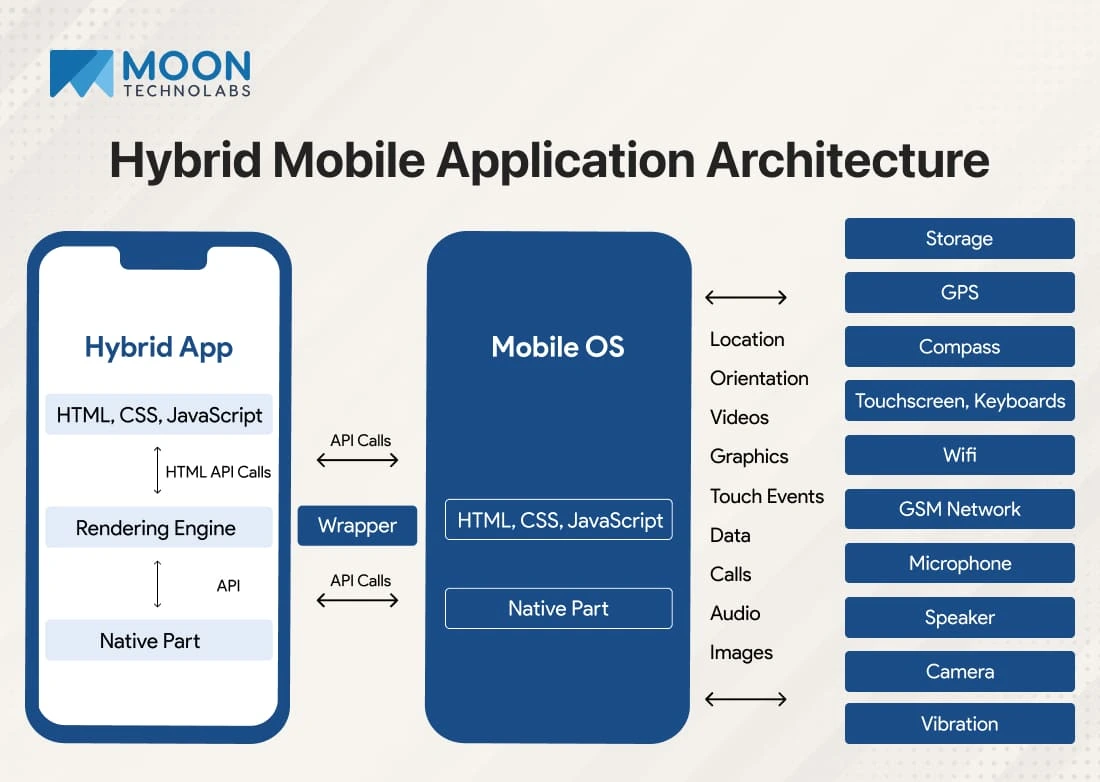
Cross-platform app development has transformed the mobile industry, enabling developers to build high-performance apps for both iOS and Android using a single codebase. Among the many options available, Flutter and React Native stand out as the two leading frameworks dominating developer preference and market adoption.
As we step into 2025, the debate intensifies: Which framework is better—Flutter or React Native? Both have evolved significantly, introducing new capabilities, improved performance, and wider ecosystem support. Whether you’re a startup founder, mobile developer, or business owner, choosing the right framework is crucial for cost, efficiency, and long-term scalability.
In this detailed comparison, we explore features, performance, architecture, development speed, ecosystem, future potential, and ultimately answer the question: Which framework wins in 2025?
1. Introduction to Flutter and React Native
1.1 What is Flutter?
Flutter, developed by Google, is a UI toolkit for building natively compiled applications for mobile, web, desktop, and embedded devices using a single codebase.
Key Highlights
- Language: Dart
- Uses its own rendering engine
- Delivers highly consistent UI across platforms
- Focus on pixel-perfect, custom UI designs
- Strong backing from Google → widely used in large-scale apps
1.2 What is React Native?
React Native, created by Facebook (Meta), is a JavaScript-based framework for building mobile apps that rely on native components.
Key Highlights
- Language: JavaScript/TypeScript
- Bridges JS code with native components
- Huge developer community
- Easy to learn for React.js web developers
- Used by global brands like Instagram, Tesla, Shopify
2. Performance Comparison in 2025
Performance is often the first comparison point—and here’s where differences become clear.
2.1 Flutter Performance
Flutter apps are compiled directly to machine code, eliminating the need for a JavaScript bridge. This ensures:
- Faster startup time
- Consistent frame rates (60–120 fps)
- Smooth animations
- Lower memory usage
- Fewer performance bottlenecks
Flutter’s custom rendering engine, Skia, draws every pixel on screen, producing visually rich interfaces with exceptional performance.
Verdict:
Flutter leads in raw performance, especially for graphics-heavy and animation-rich apps.
2.2 React Native Performance
React Native relies on a “bridge” to communicate between JavaScript code and native modules. Although improvements like JSI (JavaScript Interface) and Fabric architecture have reduced performance issues, some challenges remain:
- Occasional lag with heavy animations
- Higher chance of frame drops
- Requires more optimization
However, the 2024/2025 Fabric update significantly improved:
- Rendering performance
- Memory efficiency
- Multithreading
Verdict:
React Native performs very well, but Flutter still offers smoother default performance—especially at scale.
3. UI/UX Capabilities
3.1 Flutter UI
Flutter focuses on beautiful, custom UIs.
Benefits:
- Consistent UI across all devices
- Huge library of ready-made widgets
- Adaptive design with Material & Cupertino widgets
- Perfect for brands needing custom animations or micro-interactions
Flutter’s UI engine gives developers complete control over layouts, colors, and effects.
Verdict:
For highly polished designs, Flutter is unmatched.
3.2 React Native UI
React Native uses native components, meaning:
- More native look and feel
- Faster integration with device features
- Better consistency with iOS and Android guidelines
However, UI may vary between platforms, requiring additional adjustments.
Verdict:
For native-style UIs, React Native is great. For consistent, design-heavy UIs → Flutter wins.
4. Development Speed & Productivity
4.1 Flutter
Flutter offers:
- Hot reload
- Excellent documentation
- Ready-made widgets
- Strong CLI tools
- Dart DevTools for debugging
Dart may have a learning curve for JavaScript developers, but productivity increases quickly.
Verdict:
Fast for building polished UI apps, but requires learning Dart.
4.2 React Native
React Native is extremely beginner-friendly.
Why?
- Uses JavaScript (widely known)
- Easy for web developers to transition
- Large ecosystem of npm packages
- Strong third-party libraries
However, dependency issues and version conflicts can sometimes slow development.
Verdict:
React Native wins for learning curve and onboarding speed.
5. Community Support and Ecosystem in 2025
Flutter Ecosystem
Flutter’s ecosystem is rapidly growing with:
- Strong Google support
- Frequent updates
- Increasing enterprise adoption
- FlutterFlow & low-code ecosystem
- Expanding plugin library (pub.dev)
Verdict:
Stable and growing fast, but still smaller than JS ecosystem.
React Native Ecosystem
React Native benefits from:
- Massive JavaScript community
- Countless open-source libraries
- React ecosystem compatibility
- Support from Meta + Shopify + Microsoft
React Native’s community is huge, making learning and troubleshooting easier.
Verdict:
React Native wins in community size and availability of packages.
6. Stability and Long-Term Reliability
Flutter Stability
Flutter is strongly backed by Google, and used in major apps like:
- Google Ads
- BMW App
- eBay Motors
- Alibaba
It also supports:
- Mobile
- Web
- Desktop
- Embedded devices
Its multi-platform future is bright.
React Native Stability
React Native is used by massive companies:
- Tesla
- Walmart
- Shopify
However, JS ecosystem dependency means occasional package instability.
Verdict:
Flutter offers more predictable stability. React Native has deep industry adoption but higher dependency fragmentation.
7. Cost of Development in 2025
Both frameworks reduce development cost by enabling a single codebase.
Flutter
- Faster custom UI development
- Low maintenance cost
- Fewer bugs due to strong type system
React Native
- Larger pool of developers
- Lower hiring cost
- Faster prototyping
Verdict:
React Native is often slightly cheaper to develop due to JS talent availability.
8. Which Framework Wins in 2025?
To decide a winner, let’s break it down by use cases:
⭐ Best Performance: Flutter
⭐ Best UI/UX: Flutter
⭐ Best for startups & MVPs: React Native
⭐ Best for long-term scalability: Flutter
⭐ Best developer community: React Native
⭐ Best for web + mobile: Flutter (via Flutter Web)
⭐ Best for quick learning: React Native
⭐ Enterprise apps: Flutter
⭐ Apps requiring native feel: React Native
Final Verdict: Flutter Wins in 2025 — But React Native Still Matters
In 2025, Flutter is the stronger overall framework due to superior performance, consistency, scalability, and multi-platform capabilities. Its rapid growth and stable ecosystem make it ideal for professional-grade apps.
However, React Native remains highly valuable due to its large community, JavaScript familiarity, and strong use in MVPs and consumer apps.
Choose Flutter if:
- You need pixel-perfect UI
- You want high performance
- You are building enterprise apps
- You plan multi-platform support (Web, Desktop, Mobile)
Choose React Native if:
- You want faster development
- You already use React
- You need simple mobile apps
- You want the easiest learning curve
Both frameworks are excellent—and the right choice depends on your project goals.