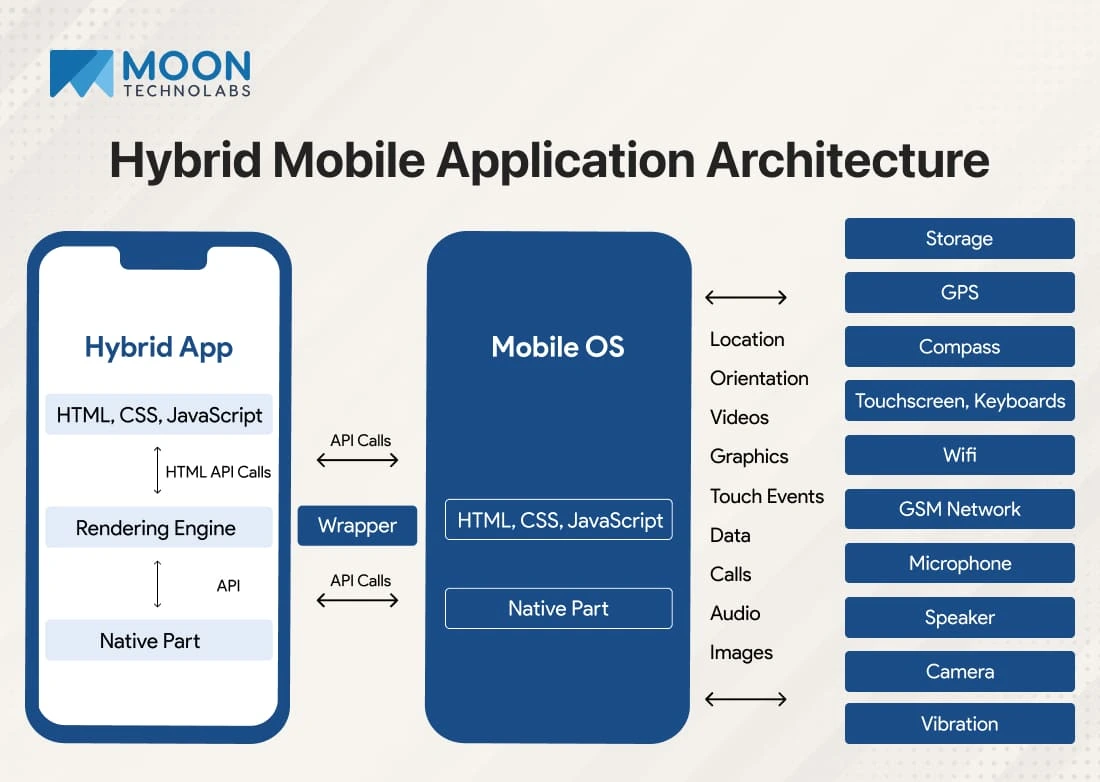
Mobile apps have become an essential part of our daily lives—helping us shop, communicate, learn, entertain, and work more efficiently. But behind every smooth, high-performing mobile app lies a well-structured architecture. For beginners entering the world of mobile development, understanding app architecture is crucial. It forms the blueprint of how an app is built, how its components interact, and how it ensures performance, scalability, and maintainability.
In this beginner-friendly guide, we’ll break down what mobile app architecture is, why it matters, its core components, popular architecture patterns, and best practices to build strong, reliable apps.
1. What Is Mobile App Architecture?
Mobile app architecture refers to the structural design that developers follow to build an app. It outlines:
- How the app’s parts interact
- How data flows between components
- How the UI communicates with the backend
- How the app handles logic, networking, and storage
Think of it as the foundation and blueprint of a building. With a strong architecture, apps become:
- Faster
- Easier to maintain
- More scalable
- Better organized
- Less error-prone
Poor architecture, on the other hand, leads to crashes, slow performance, high costs, and difficulty adding new features.
2. Why Mobile App Architecture Matters
Good architecture plays a key role in the long-term success of an app. Here’s why it’s essential:
✔ Better Performance
Optimized architecture reduces unnecessary processing, resulting in faster load times and smoother interactions.
✔ Easier Maintenance
Clear structure allows developers to update features, fix bugs, and scale without rewriting major parts of the app.
✔ Strong Security
Architectural layers protect sensitive data and reduce vulnerabilities.
✔ Scalability
Apps can easily handle growing users, features, and data without performance issues.
✔ Improved User Experience
Efficient apps with quick responses and smooth navigation keep users satisfied and engaged.
3. Key Layers of Mobile App Architecture
Most mobile apps follow a layered approach. The three major layers are:
3.1 Presentation Layer (UI/UX)
This is the front end—everything the user sees and interacts with.
Includes:
- App screens
- Navigation
- UI components (buttons, menus, forms)
- Visual design
Goals:
- Provide intuitive navigation
- Display information clearly
- Offer smooth animations and transitions
- Adapt to different screen sizes
Frameworks like SwiftUI, Jetpack Compose, React Native UI, Flutter Widgets help build this layer.
3.2 Business Logic Layer (BLL)
The Business Logic Layer handles the app’s core functionality—what happens behind the UI.
Includes:
- Algorithms
- State management
- Payment calculations
- Form validations
- Decision making
- Data transformation
Its purpose is to ensure the app behaves correctly based on user actions.
3.3 Data Layer
This is where data is stored, accessed, and managed.
Includes:
- API calls
- Database queries
- Local storage
- Cloud storage
- Data repositories
Responsibilities:
- Communicating with remote servers
- Managing local databases (SQLite, Room, CoreData, Hive)
- Handling offline mode
- Secure data storage
By separating these layers, developers maintain clean, scalable, and efficient code.
4. Components of a Good Mobile App Architecture
An effective architecture should include the following components:
4.1 Modularization
Break down the app into independent modules (authentication, payment, profile). This reduces complexity and simplifies updates.
4.2 Navigation System
A smooth and predictable navigation system improves user experience.
Frameworks:
- Android Navigation Component
- iOS Navigation Stack
- Flutter Navigator
- React Navigation
4.3 Networking Layer
Handles communication with APIs.
Tools:
- Retrofit (Android)
- Alamofire (iOS)
- Axios / Fetch (React Native)
- HTTP package (Flutter)
4.4 Error Handling
Proper architecture anticipates and manages errors such as:
- API failures
- No internet connection
- Invalid user input
This prevents app crashes and enhances stability.
4.5 Security
Architecture should ensure:
- Encrypted storage
- Secure API calls
- Authentication / authorization
- Protection against vulnerabilities
4.6 Data Caching
Improves performance and reduces API calls, especially for frequently accessed data.
5. Popular Mobile App Architecture Patterns
Beginners often struggle to choose the right architecture pattern. Here are the most widely used ones:
5.1 MVC (Model-View-Controller)
Model: Manages data
View: User interface
Controller: Connects Model and View
Good for small apps but becomes difficult to manage as the app grows.
Used in:
- iOS apps (UIKit)
- Older Android projects
5.2 MVP (Model-View-Presenter)
The Presenter handles the UI logic instead of the Controller.
Benefits:
- More testable
- Clean separation
Popular in Android before MVVM.
5.3 MVVM (Model-View-ViewModel)
The ViewModel handles UI logic and exposes data to the View through observers.
Benefits:
- Great for modern apps
- Easy to test
- Reduces boilerplate
- Works well with LiveData, StateFlow, SwiftUI, Flutter’s Provider
MVVM is the most common architecture used today.
5.4 Clean Architecture
Introduced by Robert C. Martin, this approach separates the app into:
- Presentation
- Domain
- Data
Benefits:
- Highly scalable
- Easy to maintain
- Extremely testable
Used by large-scale enterprise apps.
5.5 Unidirectional Data Flow (UDF)
Used in frameworks like:
- Flutter (Bloc, Provider)
- React Native (Redux)
Benefits:
- Predictable state
- Easier debugging
- Suitable for complex apps
6. Backend Architecture in Mobile Apps
Behind every mobile app lies a backend architecture that handles:
✔ User authentication
✔ Data storage
✔ Push notifications
✔ Payment processing
✔ Server-side logic
✔ Analytics
Common backend technologies:
- Node.js
- Firebase
- Django
- Laravel
- Spring Boot
- AWS Amplify
- Supabase
Backend architecture must be scalable, secure, and optimized for low latency.
7. Factors to Consider When Designing Mobile App Architecture
7.1 Platform (iOS, Android, Cross-Platform)
Architecture structure may vary depending on the platform.
- SwiftUI + Combine (for iOS)
- Kotlin + Jetpack Compose (for Android)
- Flutter or React Native (for cross-platform)
7.2 Type of App
Architecture differs for:
- Ecommerce apps
- Social media apps
- IoT apps
- Gaming apps
- Fintech apps
- On-demand apps
7.3 Performance Requirements
High-performance apps need:
- Caching
- Asynchronous processing
- Local storage
- Efficient networking
7.4 Scalability Needs
Apps expecting large user growth must adopt patterns like:
- MVVM
- Clean Architecture
- Microservices backend
7.5 Offline Functionality
Apps without internet access should still operate using local storage and sync mechanisms.
8. Best Practices for Beginners
To build a clean and efficient app architecture, follow these tips:
8.1 Keep It Simple
Avoid over-engineering. Start with basic architecture and improve as needed.
8.2 Separate UI and Logic
Never mix UI code with business logic—this makes maintenance difficult.
8.3 Use Design Patterns
Patterns like MVVM, Repository Pattern, Dependency Injection make apps more scalable.
8.4 Follow Coding Standards
Use consistent naming, folder structures, and documentation.
8.5 Optimize for Performance
Implement:
- Lazy loading
- Caching
- Optimized API calls
- Efficient data handling
8.6 Always Think Scalability
Build architecture that can grow with your app’s user base and features.
8.7 Use Thorough Testing
Unit tests, UI tests, and integration tests ensure strong app quality.
9. Common Mistakes Beginners Should Avoid
- Mixing business logic with UI
- Ignoring data flow design
- Adding too many dependencies
- Not planning navigation early
- Poor error handling
- Not optimizing network calls
- Failing to secure user data
Avoiding these mistakes can save huge development time and effort.
10. Conclusion
Understanding mobile app architecture is essential for beginners who want to build reliable, scalable, and well-performing apps. A strong architecture ensures that the app runs smoothly, adapts to new features easily, and delivers a great user experience.
By learning the layers, components, and popular patterns like MVC, MVP, MVVM, and Clean Architecture, developers can make informed decisions that lead to successful project outcomes.
Whether you’re building a simple app or a large enterprise solution, a well-designed architecture is the foundation of every great mobile application.
Leave a Reply