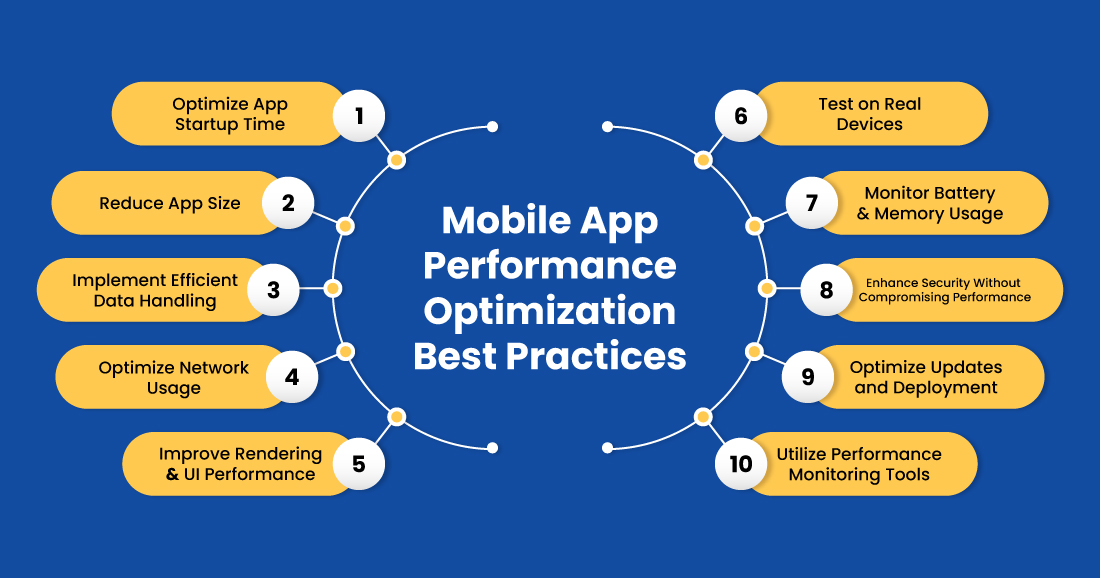
In today’s digital landscape, users expect mobile applications to be fast, responsive, and reliable. Even the best-designed app can fail if its performance is poor—slow loading times, battery drain, crashes, or lagging interactions can drive users to uninstall instantly. A high-performing app keeps users engaged, boosts retention, improves ratings, and enhances overall brand perception.
As mobile apps grow more complex with increased functionality and data processing, optimizing performance is more important than ever. This comprehensive guide explores effective techniques, tools, and best practices to help developers improve mobile app performance for iOS and Android platforms.
1. Why App Performance Optimization Matters
Performance directly impacts user satisfaction and business success. Here’s why app optimization is crucial:
✔ User Retention
Slow apps cause frustration, leading users to abandon or uninstall them. Studies show users expect apps to load within 2 seconds or less.
✔ Higher App Store Rankings
Performance issues often result in negative reviews. Optimized apps receive better ratings, leading to higher visibility and downloads.
✔ Better Conversion Rates
Fast apps improve user journey efficiency, increasing conversions in ecommerce, fintech, SaaS, and service-based apps.
✔ Reduced Resource Usage
Optimizing performance reduces battery consumption, memory usage, and data load—ensuring smoother experiences on all devices.
2. Key App Performance Metrics to Track
Before optimizing, it’s essential to know what to measure. Core metrics include:
2.1 App Load Time
How long the app takes from launch to fully usable.
2.2 Frame Rate (FPS)
Smooth animations and transitions rely on stable frame rates (typically 60 FPS for mobile).
2.3 Memory Usage
Excessive memory consumption can lead to crashes and slowdowns.
2.4 CPU Usage
High CPU usage means overheating, battery drain, and lag.
2.5 Network Latency
Measure the delay in sending/receiving data from servers or APIs.
2.6 Crash Rate
An app should maintain a low crash percentage—preferably below 1%.
Tools like Firebase Performance Monitoring, Xcode Instruments, and Android Profiler help track these metrics.
3. Techniques to Improve App Performance
Let’s explore powerful optimization techniques that significantly enhance speed, responsiveness, and stability.
3.1 Optimize App Launch Time
A fast app launch creates a strong first impression. Techniques include:
- Reduce the work executed during
onCreate()in Android ordidFinishLaunchingin iOS. - Lazy-load features instead of loading all modules at startup.
- Use lightweight splash screens.
- Minimize app initialization code.
- Defer non-essential API calls.
Aim: Your app should launch in under 2 seconds.
3.2 Use Efficient Data Loading
Data-heavy apps must handle loading smartly:
✔ Implement pagination
Load content in chunks instead of fetching everything at once.
✔ Use background loading
Run heavy tasks on background threads, not on the main UI thread.
✔ Use caching strategies
Cache API responses, images, and static content to reduce redundant requests.
✔ Optimize database queries
Use indexing, optimized schemas, and reduction of unnecessary joins.
3.3 Reduce Network Usage
Network calls are expensive and slow down performance.
Techniques:
- Compress API responses
- Use HTTP/2 or gRPC for faster data transport
- Implement offline mode
- Reduce frequency of real-time API polls
- Cache API responses intelligently
- Batch multiple small network calls
Optimizing network usage makes the app faster and more reliable, especially in low-connectivity regions.
3.4 Optimize Images and Media Content
Images often contribute most to app bloat.
Use the following:
- WebP format for lightweight images
- Lazy loading for media
- Responsive image sizing
- Compress images without losing quality
- Use vector graphics where possible
Optimized images reduce load time and improve UI smoothness.
3.5 Reduce and Optimize App Size
Large app sizes deter installations and slow performance.
Optimization strategies:
- Remove unnecessary libraries
- Use ProGuard or R8 for Android code shrinking
- Split APKs by architecture
- Use on-demand feature modules
- Minify resources like fonts and images
A smaller app means quicker downloads, less disk usage, and better performance.
3.6 Improve Rendering and UI Performance
UI responsiveness is essential for a smooth user experience.
Best practices:
- Maintain 60 FPS
- Avoid heavy layout nesting
- Use ConstraintLayout (Android) and AutoLayout (iOS)
- Preload UI components
- Minimize overdraw
- Keep animations lightweight
A snappy UI keeps users engaged and satisfied.
3.7 Use Background Threads for Heavy Tasks
Don’t block the main UI thread.
Move tasks such as:
- JSON parsing
- File operations
- Image processing
- API calls
- Database queries
Use:
- Coroutines (Kotlin)
- RxJava
- AsyncTask (deprecated but replaced by better alternatives)
- GCD (iOS)
- Combine framework (iOS)
This ensures seamless interactions.
3.8 Optimize Battery Usage
Battery drain can lead to negative reviews and uninstalls.
Reduce power consumption by:
- Minimizing GPS and location checks
- Reducing background services
- Avoiding unnecessary wake-locks
- Using push notifications instead of polling
- Optimizing network calls
Efficient battery usage strengthens user trust.
3.9 Ensure Smooth Scroll and Transition Performance
Laggy scrolling feels unprofessional.
Improve performance by:
- Using view recycling (RecyclerView, UITableView)
- Prefetching lists
- Reducing heavy UI overlays
- Avoiding large DOM-like UI trees
- Using placeholders for content loading
Scrolling should feel natural and fluid.
3.10 Use Performance Testing Tools
Always test app performance under real-world conditions using:
Tools:
- Android Profiler
- Xcode Instruments
- Firebase Performance
- Flipper
- New Relic
- AppDynamics
- Charles Proxy
Performance testing ensures consistent reliability across devices.
4. Advanced Optimization Techniques
Once basic optimizations are in place, advanced techniques can supercharge performance.
4.1 Leverage CDN for Faster Content Delivery
Using Content Delivery Networks allows users worldwide to access content quickly.
Benefits:
- Lower latency
- Faster API responses
- Improved security
- More reliable content loading
CDNs drastically enhance media-heavy apps.
4.2 Use Machine Learning for Predictive Performance
AI can help optimize:
- Cache invalidation
- Image compression
- Prefetching user data
- Personalizing app experience
Machine learning models predict usage patterns and optimize accordingly.
4.3 Adopt 5G-Aware Optimization
Apps can leverage 5G networks to:
- Stream high-quality content
- Offload computations to the cloud
- Improve real-time interactions
- Reduce local resource usage
5G opens new performance possibilities.
4.4 Implement Code Optimization
Efficient code helps reduce load time and memory consumption.
Practices:
- Remove dead code
- Refactor complex methods
- Optimize loops and recursion
- Use efficient data structures
- Avoid memory leaks
Clean code equals optimal performance.
4.5 Use On-Demand Resources
Instead of loading everything on launch:
- Download resource packs only when needed
- Stream data dynamically
- Use app bundles for modular delivery
This keeps the app lightweight and fast.
5. Reducing Crash Rates and Improving Stability
Stability is as crucial as speed.
Reduce crashes by:
- Avoiding null pointer exceptions
- Handling API failures gracefully
- Monitoring memory leaks
- Testing across device types
- Logging errors for future fixes
- Implementing retry logic for network calls
Stable apps build long-term user loyalty.
6. Monitoring & Continuous Optimization
Performance optimization isn’t a one-time job.
Continuously monitor:
- App startup performance
- User sessions
- Crash logs
- Slow API responses
- Memory leaks
- Network performance
Deploy updates regularly to keep the app at peak performance.
7. Common Mistakes That Hurt App Performance
Avoid these pitfalls:
- Loading too much data at once
- Running heavy tasks on the main thread
- Excessive API polling
- Unoptimized image formats
- Lack of caching
- Poor memory management
- Overuse of animations
Addressing these issues drastically improves user experience.
8. Conclusion
Improving app performance is essential to delivering top-notch user experiences and ensuring long-term success. By optimizing loading times, reducing memory and network usage, improving UI responsiveness, and using the right tools, developers can create apps that feel fast, smooth, and reliable across all devices.
As user expectations rise and apps become more complex, performance optimization becomes an ongoing process—one that pays off with better retention, higher ratings, and stronger brand loyalty.
With the techniques in this guide, you can build high-performing mobile apps that users love and trust.
Leave a Reply